Polycom 400 Instrukcja Użytkownika Strona 1
Przeglądaj online lub pobierz Instrukcja Użytkownika dla Telefony Polycom 400. Polycom 400 User Manual Instrukcja obsługi
- Strona / 132
- Spis treści
- ROZWIĄZYWANIE PROBLEMÓW
- BOOKMARKI
Oceniono. / 5. Na podstawie oceny klientów

PRESSONE
the future of global communications
hosted iPBX solutions
powered by
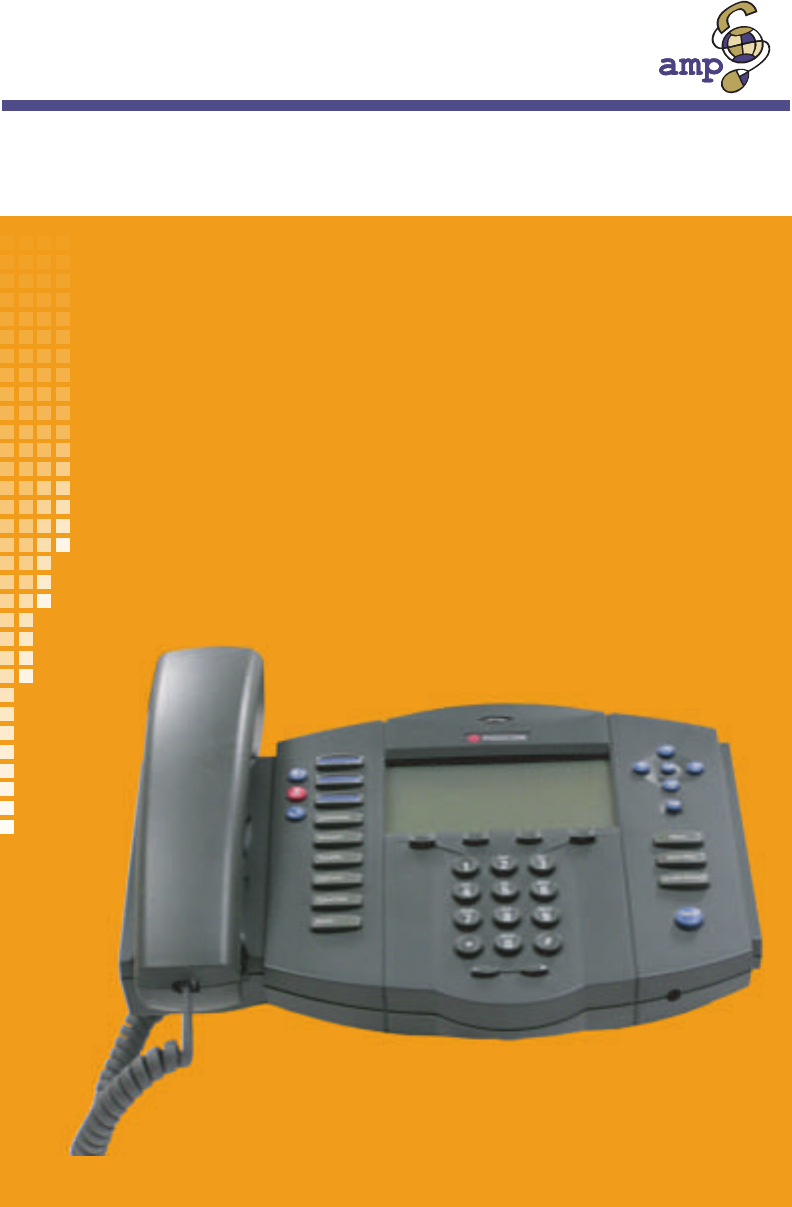
Polycom Soundpoint IP Phone
USER GUIDE
pcsp500rev1.0.012004
- PRESSONE 1
- Table of Contents 2
- Chapter 1 8
- Your Polycom Telephone 8
- 621-00000092 10
- Moving Your Telephone 11
- Chapter 2 14
- Basic Phone Features 14
- Hanging Up 15
- Dial Tone and Ringer Patterns 16
- Making an External Call 16
- Making an Internal Call 17
- Using a Headset 17
- Using the Speakerphone 18
- Speakerphone Troubleshooting 19
- Chapter 3 20
- PressOne Telephone Features 20
- Anonymous Call Rejection 23
- Authorization Code Calling 23
- Billing Codes 24
- Blind Transfer 25
- Call Back Queuing 25
- • 1 - Enable/disable feature 26
- Enabling/Disabling Call Block 27
- Listing Blocked Numbers 28
- Call Forward (All Calls) 30
- Call Forward (Busy) 31
- Call Forward (No Answer) 32
- Call Pickup 33
- Call Return 34
- Call Trace 35
- Call Waiting 35
- Call Waiting with Caller ID 36
- Call Waiting with ID Manager 36
- Caller ID Block 37
- Conference 37
- Direct Extension Assignment 39
- Do Not Disturb 41
- Group Speed Dial 42
- Hold-on Queuing 42
- Hunt Groups 43
- Intercom 43
- Meet-Me Conference 44
- Dialing In Too Early 46
- Entering an Incorrect ID 46
- • Hang up 49
- MultiLine Call Park 51
- Music on Hold 52
- On-hook Dialing 54
- One-Touch Transfer 55
- Phone Configurator 56
- Priority Call 58
- Listing Priority Call Members 60
- Finding Your Queues 62
- Logging Into/Out of Queues 62
- Answering Calls from Queues 62
- …using the Phone 63
- …using Star Codes 63
- Remote Phone 65
- Dial-in Setup of Remote Phone 66
- Selective Call Forward 67
- Speed Dial 72
- Modifying a Speed Dial Number 73
- Deleting a Speed Dial Number 73
- Star Codes 74
- Transfer 75
- Chapter 4 78
- Voice Mail Features 78
- Menus and Commands 79
- Accessing Your Voice Mail 83
- Rewind/Fast Forward 86
- Skip to the End of a Message 86
- Pause Play of a Message 86
- Compose and Send a Message 87
- Marking a Message as Urgent 88
- Changing Your Password 88
- Operator 89
- Replaying a Message 90
- Saving a Message 90
- Skipping to the Next Message 91
- Deleting a Message 91
- Replying to a Message 92
- Dialing Back a Caller 92
- Extension 93
- Listening to Your Greetings 94
- Receiving Pager Notification 94
- Managing Distribution Groups 95
- Available Options 96
- Creating a New Group 96
- Editing or Modifying a Group 97
- Deleting a Group 100
- Exiting the Voice Mail System 101
- Chapter 5 102
- Set Up Outlook for TAPI 102
- Actions pop-up menu 103
- Configuring Windows for TAPI 110
- 5. Click Apply 112
- Provider dialog box 117
- New Call dialog box 123
- Numerics 124
- Cancel Forward 24 125
- Configuring for TAPI 103 131
- Zero Out to Operator 82 131
Podsumowanie treści
Strona 1 - PRESSONE
PRESSONEthe future of global communicationshosted iPBX solutionspowered byPolycom Soundpoint IP PhoneUSER GUIDEpcsp500rev1.0.012004
Strona 2 - Table of Contents
Polycom Telephone User Guide Your Polycom Telephone 3621-00000092The large 3-line x 19-character LCD display provides features such as date and time,
Strona 3
Polycom Telephone User Guide Voice Mail Features 93621-00000092Deleting a Group1. Press the button on your phone you use to access the voice mail syst
Strona 4
94 Voice Mail Features Polycom Telephone User Guide621-00000092• the total number of members in the group.While reviewing the list of groups, you can
Strona 5
Polycom Telephone User Guide Set Up Outlook for TAPI 95621-00000092Chapter 5Set Up Outlook for TAPIThis chapter explains how you can set up and use Mi
Strona 6
96 Set Up Outlook for TAPI Polycom Telephone User Guide621-000000921. Start Outlook (if not already running).2. Click the Contacts icon to switch to t
Strona 7
Polycom Telephone User Guide Set Up Outlook for TAPI 97621-000000924. Click Call Contact on the menu (circled in the previous screen) to open the New
Strona 8 - Your Polycom Telephone
98 Set Up Outlook for TAPI Polycom Telephone User Guide621-000000928. End the call by hanging up the handset, pressing the speaker button or clicking
Strona 9
Polycom Telephone User Guide Set Up Outlook for TAPI 99621-000000926. Choose where to save the TAPI.EXE file and click Save. This example saves it to
Strona 10 - 621-00000092
100 Set Up Outlook for TAPI Polycom Telephone User Guide621-000000928. Click Next in the Welcome dialog box to install the PressOneTAPI program.9. Cli
Strona 11 - Moving Your Telephone
Polycom Telephone User Guide Set Up Outlook for TAPI 101621-0000009211. When the VocalData VOISS dialog box appears while the Installing dialog box co
Strona 12
102 Set Up Outlook for TAPI Polycom Telephone User Guide621-0000009212. Enter your telephone number and password and click OK.13. Click OK in the Voca
Strona 13
4 Your Polycom Telephone Polycom Telephone User Guide621-00000092Moving Your TelephoneBefore moving your telephone, you should check with your system
Strona 14 - Basic Phone Features
Polycom Telephone User Guide Set Up Outlook for TAPI 103621-00000092Configuring Windows for TAPIFor TAPI-enabled programs to be able to dial using the
Strona 15 - Hanging Up
104 Set Up Outlook for TAPI Polycom Telephone User Guide621-000000924. In the Edit Location dialog box, click the General tab (if not selected) and do
Strona 16 - Making an External Call
Polycom Telephone User Guide Set Up Outlook for TAPI 105621-000000925. Click Apply.
Strona 17 - Using a Headset
106 Set Up Outlook for TAPI Polycom Telephone User Guide621-000000926. Click the Area Code Rules tab and do one of the following:• Click New to add an
Strona 18 - Using the Speakerphone
Polycom Telephone User Guide Set Up Outlook for TAPI 107621-00000092multiple area codes that are not long distance - by filling in the necessary infor
Strona 19 - Speakerphone Troubleshooting
108 Set Up Outlook for TAPI Polycom Telephone User Guide621-00000092• “Include all the prefixes within this area code” is selected.• “Dial 1” is unche
Strona 20 - PressOne Telephone Features
Polycom Telephone User Guide Set Up Outlook for TAPI 109621-0000009211. If you completed the VocalData VOISS setup as part of the TAPI install from We
Strona 21
110 Set Up Outlook for TAPI Polycom Telephone User Guide621-0000009212. If you did not complete the VocalData VOISS setup as part of the TAPI install
Strona 22
Polycom Telephone User Guide Set Up Outlook for TAPI 111621-0000009214. When the VocalData VOISS dialog box appears, do the following:a. Enter the IP
Strona 23 - Authorization Code Calling
112 Set Up Outlook for TAPI Polycom Telephone User Guide621-0000009215. Enter your telephone number and password and click OK.
Strona 24 - Billing Codes
Polycom Telephone User Guide Your Polycom Telephone 5621-000000922. Take the telephone to the new location.3. Plug the telephone into the LAN connecti
Strona 25 - Call Back Queuing
Polycom Telephone User Guide Set Up Outlook for TAPI 113621-0000009216. Click OK in the VocalData VOISS dialog box to return to the Phone and Modem Op
Strona 26 - • 1 - Enable/disable feature
114 Set Up Outlook for TAPI Polycom Telephone User Guide621-00000092Configuring Outlook to Use TAPITo configure Outlook or another TAPI-enabled progra
Strona 27 - Enabling/Disabling Call Block
Polycom Telephone User Guide Set Up Outlook for TAPI 115621-000000924. Click Call Contact on the menu (circled in the previous screen) to open the New
Strona 28 - Listing Blocked Numbers
116 Set Up Outlook for TAPI Polycom Telephone User Guide621-000000927. Select your telephone number and click OK to return to the New Call dialog box.
Strona 29
Polycom Telephone User Guide I-1621-00000092IndexNumerics911 calls, disconnecting 57AAbbreviated Dial 13Abbreviated Dial CodeCreate 14Delete 15Modify
Strona 30 - Call Forward (All Calls)
I-2 Polycom Telephone User Guide621-00000092Phone Feature Buttons 23Disable Call Forward 24Set Forward 23Star CodesDisable 24Call Forward (Busy) 24Dis
Strona 31 - Call Forward (Busy)
Polycom Telephone User Guide I-3621-00000092Add Members 91Change Name 92Delete Members 91List Members 91Play Name 92Enable Call Forward (All Calls)Pho
Strona 32 - Call Forward (No Answer)
I-4 Polycom Telephone User Guide621-00000092MicrophoneAdjusting the Volume 7Modifying Voice Mail DistributionGroup 90Add Members 91Change Name 92Delet
Strona 33 - Call Pickup
Polycom Telephone User Guide I-5621-00000092SSaving a Voice Mail Message 83Second Call (Answer) 8Selective Call Forward 60Add Forwarded Numbers 62Dele
Strona 34 - Call Return
I-6 Polycom Telephone User Guide621-00000092Call Block (Selective Call Rejection)19Call Forward (All Calls) 23Phone Feature Buttons 23Call Forward (Bu
Strona 35 - Call Waiting
6 Your Polycom Telephone Polycom Telephone User Guide621-00000092
Strona 36 - Call Waiting with ID Manager
Polycom Telephone User Guide I-7621-00000092Enable 61Enter Forward Number 62Identify Forwarding DestinationNumber 62List Forwarded Numbers 63Speaker 6
Strona 37 - Conference
I-8 Polycom Telephone User Guide621-00000092Configuring for TAPI 103ZZero Out to Operator 82
Strona 39 - Direct Extension Assignment
Polycom Telephone User Guide Basic Phone Features 7621-00000092Chapter 2Basic Phone FeaturesAdjusting the VolumeThere are two keys labeled with a plus
Strona 40
8 Basic Phone Features Polycom Telephone User Guide621-00000092• Press the button to talk to the caller using the speakerphone.NOTE: If you answered
Strona 41 - Do Not Disturb
Polycom Telephone User Guide Basic Phone Features 9621-00000092Dial Tone and Ringer PatternsThe VOISS telephone system generates different ringer and
Strona 42 - Hold-on Queuing
10 Basic Phone Features Polycom Telephone User Guide621-000000923. Dial the desired number, including “1” and the area code, if required (as supported
Strona 43 - Intercom
Polycom Telephone User Guide Basic Phone Features 11621-00000092Using the SpeakerphoneYour telephone is equipped with a speakerphone that lets you con
Strona 44 - Meet-Me Conference
12 Basic Phone Features Polycom Telephone User Guide621-00000092Speakerphone TroubleshootingProblem SolutionYou can’t hear callers on the speaker.Incr
Strona 45
Polycom Telephone User Guide i621-00000092Table of Contents1 Your Polycom Telephone ... 1Introduction ...
Strona 46 - Entering an Incorrect ID
Polycom Telephone User Guide VocalData Telephone Features 13621-00000092Chapter 3PressOne Telephone FeaturesThis chapter contains an alphabetical summ
Strona 47
14 VocalData Telephone Features Polycom Telephone User Guide621-00000092Creating an Abbreviated Dial Code1. Press 75#.NOTE: A voice prompt will lead y
Strona 48
Polycom Telephone User Guide VocalData Telephone Features 15621-000000924. Dial the phone number you want to assign to this Abbreviated Dial code foll
Strona 49 - • Hang up
16 VocalData Telephone Features Polycom Telephone User Guide621-000000923. Press the Abbreviated Dial code you wish to verify.The phone number you ent
Strona 50
Polycom Telephone User Guide VocalData Telephone Features 17621-000000923. Enter the authorization code (obtained from your system administrator). Whe
Strona 51 - MultiLine Call Park
18 VocalData Telephone Features Polycom Telephone User Guide621-000000922. Enter the associated billing code for the call. The other party will hear t
Strona 52 - Music on Hold
Polycom Telephone User Guide VocalData Telephone Features 19621-000000923. Answer the call to have the system automatically dial the external number f
Strona 53
20 VocalData Telephone Features Polycom Telephone User Guide621-00000092Enabling/Disabling Call BlockThe PressOne system allows you to turn the Call B
Strona 54 - On-hook Dialing
Polycom Telephone User Guide VocalData Telephone Features 21621-000000924. Press # to save the entry or * to exit without saving.5. Select a menu item
Strona 55 - One-Touch Transfer
22 VocalData Telephone Features Polycom Telephone User Guide621-00000092• Press * to return to the Call Block menu.4. Press 1 to remove a specific num
Strona 56 - Phone Configurator
ii Polycom Telephone User Guide621-00000092Deleting an Abbreviated Dial Code ... 15Verifying an Abbreviated Di
Strona 57
Polycom Telephone User Guide VocalData Telephone Features 23621-00000092Call Forward (All Calls)Call Forward (All Calls) allows you to forward all cal
Strona 58 - Priority Call
24 VocalData Telephone Features Polycom Telephone User Guide621-00000092• Pickup and replace the handset.Call forward (all) is enabled and the display
Strona 59
Polycom Telephone User Guide VocalData Telephone Features 25621-00000092Enabling Call Forward (Busy)1. Press 76# on the telephone keypad. The speaker
Strona 60 - Listing Priority Call Members
26 VocalData Telephone Features Polycom Telephone User Guide621-00000092NOTE: Calls forwarded to an off-net number that are unanswered will roll over
Strona 61
Polycom Telephone User Guide VocalData Telephone Features 27621-000000922. Dial the ringing extension number to begin speaking with the caller.Group C
Strona 62 - Answering Calls from Queues
28 VocalData Telephone Features Polycom Telephone User Guide621-00000092Call TraceCall Trace allows you to record the telephone number of an offending
Strona 63 - …using Star Codes
Polycom Telephone User Guide VocalData Telephone Features 29621-00000092Answering the Second CallTo answer a second call without ending the current ca
Strona 64
30 VocalData Telephone Features Polycom Telephone User Guide621-00000092• Press 1 to send the call to voice mail.• Press 2 to send a "Please Hold
Strona 65 - Remote Phone
Polycom Telephone User Guide VocalData Telephone Features 31621-000000921. Make a call or be engaged in a call.2. Press the Conference button. The cal
Strona 66 - Dial-in Setup of Remote Phone
32 VocalData Telephone Features Polycom Telephone User Guide621-00000092• Internal Dial Tone – A continuous, higher-pitched tone• External (Outside) D
Strona 67 - Selective Call Forward
Polycom Telephone User Guide iii621-00000092Call Return... 27Call Tra
Strona 68
Polycom Telephone User Guide VocalData Telephone Features 33621-000000921. From the guest /new phone, dial 588 (or the code provided by your system ad
Strona 69
34 VocalData Telephone Features Polycom Telephone User Guide621-00000092Do Not DisturbDo Not Disturb instantly routes all your incoming calls to anoth
Strona 70
Polycom Telephone User Guide VocalData Telephone Features 35621-00000092Group Speed DialThis feature provides additional speed dialing capabilities be
Strona 71
36 VocalData Telephone Features Polycom Telephone User Guide621-00000092When you try to make an external call and all outgoing lines are unavailable,
Strona 72 - Speed Dial
Polycom Telephone User Guide VocalData Telephone Features 37621-00000092Meet-Me ConferenceIf supported by your system, Meet-Me Conferencing provides t
Strona 73 - Deleting a Speed Dial Number
38 VocalData Telephone Features Polycom Telephone User Guide621-00000092To join a Meet-Me Conference1. If dialing internally, dial the Meet-Me Join nu
Strona 74 - Star Codes
Polycom Telephone User Guide VocalData Telephone Features 39621-00000092• When you join the conference, if you are the third (or later) conferee to jo
Strona 75 - Transfer
40 VocalData Telephone Features Polycom Telephone User Guide621-00000092Roll CallDuring a conference call, the moderator may initiate a roll call of t
Strona 76
Polycom Telephone User Guide VocalData Telephone Features 41621-00000092lack of courtesy, among others. To drop a conference call, press *7. All calle
Strona 77
42 VocalData Telephone Features Polycom Telephone User Guide621-00000092• Hang up.Canceling a Meet-Me ConferenceYou may cancel a conference reservatio
Strona 78 - Voice Mail Features
iv Polycom Telephone User Guide621-00000092Getting a List of Meet-Me Conferences... 44MultiLine Call Park...
Strona 79 - Menus and Commands
Polycom Telephone User Guide VocalData Telephone Features 43621-000000923. Enter the Moderator ID that was received when the conference was scheduled
Strona 80
44 VocalData Telephone Features Polycom Telephone User Guide621-00000092Getting a List of Meet-Me Conferences1. If dialing internally, dial the Meet-M
Strona 81
Polycom Telephone User Guide VocalData Telephone Features 45621-000000921. Take the phone off-hook by doing one of the following:• Press the Speaker b
Strona 82
46 VocalData Telephone Features Polycom Telephone User Guide621-00000092• “Day” mode (or Mode 1) is defined by default as Monday - Friday, 8:00 am to
Strona 83 - Accessing Your Voice Mail
Polycom Telephone User Guide VocalData Telephone Features 47621-00000092The following table shows how to activate the various states of Night mode.On-
Strona 84
48 VocalData Telephone Features Polycom Telephone User Guide621-00000092• Press the button and dial the number.• Press a speed dial button. • Press t
Strona 85
Polycom Telephone User Guide VocalData Telephone Features 49621-000000922. Press the one-touch transfer button (J Smith VM) to transfer the call.3. Ha
Strona 86 - Pause Play of a Message
50 VocalData Telephone Features Polycom Telephone User Guide621-00000092Assigning Your Phone Number to Your PhoneWhen your phone is first installed, y
Strona 87 - Compose and Send a Message
Polycom Telephone User Guide VocalData Telephone Features 51621-00000092in conference rooms with analog speaker phones or at other locations with an a
Strona 88 - Changing Your Password
52 VocalData Telephone Features Polycom Telephone User Guide621-00000092If you have a display on your telephone, the options for each menu level appea
Strona 89 - Operator
Polycom Telephone User Guide v621-00000092Enabling/Disabling Selective Call Forward... 61Entering the Forwarding Destination
Strona 90 - Saving a Message
Polycom Telephone User Guide VocalData Telephone Features 53621-00000092Listing Priority Call Members1. Press *61.A voice prompt tells you whether Pri
Strona 91 - Deleting a Message
54 VocalData Telephone Features Polycom Telephone User Guide621-00000092• You are prompted to enter the number to delete followed by the # key.4. Ente
Strona 92 - Dialing Back a Caller
Polycom Telephone User Guide VocalData Telephone Features 55621-00000092Queue/ACD (Automatic Call Distribution)The Automatic Call Distribution (ACD) q
Strona 93 - Extension
56 VocalData Telephone Features Polycom Telephone User Guide621-00000092Viewing Calls-in-queue InformationIf the Display Queue Status feature has been
Strona 94 - Receiving Pager Notification
Polycom Telephone User Guide VocalData Telephone Features 57621-00000092Hanging up a call this way means you will not get the reminder tone in the han
Strona 95 - Managing Distribution Groups
58 VocalData Telephone Features Polycom Telephone User Guide621-00000092Canceling Remote Forwarding1. Dial the DID number for Remote Access to Call Fo
Strona 96 - Creating a New Group
Polycom Telephone User Guide VocalData Telephone Features 59621-00000092phone instead. Callers will hear an announcement asking them to wait while the
Strona 97 - Editing or Modifying a Group
60 VocalData Telephone Features Polycom Telephone User Guide621-00000092You can also press the Remote button on the PressOne IP phone to deactivate th
Strona 98
Polycom Telephone User Guide VocalData Telephone Features 61621-00000092To use this feature, you designate the forward destination and manage a list o
Strona 99
62 VocalData Telephone Features Polycom Telephone User Guide621-00000092Entering the Forwarding Destination Number1. Press *63 or *83.A voice prompt t
Strona 100 - Deleting a Group
vi Polycom Telephone User Guide621-00000092Skipping to the Next Message ... 84Deleting a Message ..
Strona 101 - Exiting the Voice Mail System
Polycom Telephone User Guide VocalData Telephone Features 63621-000000925. Select another menu item or hang up.Listing Forwarded Phone Numbers1. Press
Strona 102 - Set Up Outlook for TAPI
64 VocalData Telephone Features Polycom Telephone User Guide621-000000924. Press 1 to remove a specific number.5. Enter the number with no spaces, das
Strona 103 - Actions pop-up menu
Polycom Telephone User Guide VocalData Telephone Features 65621-00000092SpeakerPress the (Speaker) button to turn on your speakerphone, to select yo
Strona 104
66 VocalData Telephone Features Polycom Telephone User Guide621-00000092Identifying the Number Assigned to a Speed Dial ButtonChoose one of the follow
Strona 105
Polycom Telephone User Guide VocalData Telephone Features 67621-00000092Star CodesThe codes used by analog DTMF users to activate features (commonly r
Strona 106
68 VocalData Telephone Features Polycom Telephone User Guide621-00000092TransferUse this feature to transfer a call to another number. See also“Blind
Strona 107
Polycom Telephone User Guide VocalData Telephone Features 69621-000000924. If the called party does not answer, you can do one of the following:• Pres
Strona 108
70 VocalData Telephone Features Polycom Telephone User Guide621-00000092
Strona 109
Polycom Telephone User Guide Voice Mail Features 71621-00000092Chapter 4Voice Mail FeaturesThe PressOne voice mail system stores messages in your pers
Strona 110 - Configuring Windows for TAPI
72 Voice Mail Features Polycom Telephone User Guide621-00000092Menus and CommandsThe following tables show the main voice mail menu along with the mes
Strona 111
Polycom Telephone User Guide Your Polycom Telephone 1621-00000092Chapter 1Your Polycom TelephoneIntroductionThis guide describes how to use all of the
Strona 112 - 5. Click Apply
Polycom Telephone User Guide Voice Mail Features 73621-00000092NOTE: If you are listening to the introductory message and you press *, you will exit f
Strona 113
74 Voice Mail Features Polycom Telephone User Guide621-00000092Your service provider may have selected an Octel-style voice mail menu for you. If so,
Strona 114
Polycom Telephone User Guide Voice Mail Features 75621-000000928 Hear or change custom operator number(Not supported for stand-alone mailboxes)NOTE: O
Strona 115
76 Voice Mail Features Polycom Telephone User Guide621-00000092Accessing Your Voice MailYou can access your voice mailbox from several different sourc
Strona 116
Polycom Telephone User Guide Voice Mail Features 77621-000000922. Enter your extension number. You are prompted to enter your password.3. Enter your n
Strona 117 - Provider dialog box
78 Voice Mail Features Polycom Telephone User Guide621-00000092record new greetings, or exit the voice mail system.To select the desired option, press
Strona 118
Polycom Telephone User Guide Voice Mail Features 79621-00000092clarity of the message. Also remember to check the volume level on your speakers before
Strona 119
80 Voice Mail Features Polycom Telephone User Guide621-00000092Composing Messages before SendingThe compose feature of the voice mail system allows yo
Strona 120
Polycom Telephone User Guide Voice Mail Features 81621-00000092Marking a Message as UrgentTo mark a message as urgent, which places it in the recipien
Strona 121
82 Voice Mail Features Polycom Telephone User Guide621-00000092Returning to the Auto Attendant or OperatorWhen calling from outside of the PressOne sy
Strona 122
2 Your Polycom Telephone Polycom Telephone User Guide621-00000092forwarding, redialing, speed dialing, transferring calls, conference calls, and acces
Strona 123 - New Call dialog box
Polycom Telephone User Guide Voice Mail Features 83621-000000924. Do one of the following:• Press 1 to change your custom operator number, see step 5.
Strona 124 - Numerics
84 Voice Mail Features Polycom Telephone User Guide621-00000092Skipping to the Next MessageTo skip to the next voice mail message, press 8.Deleting a
Strona 125 - Cancel Forward 24
Polycom Telephone User Guide Voice Mail Features 85621-00000092• Press 2 to change the introductory message.• Press 3 to review the introductory messa
Strona 126
86 Voice Mail Features Polycom Telephone User Guide621-00000092Sending a Message Directly to an ExtensionYou can send a voice mail message directly to
Strona 127
Polycom Telephone User Guide Voice Mail Features 87621-00000092• Press 1 to record the No Answer greeting.• Press 2 to record the Do Not Disturb greet
Strona 128
88 Voice Mail Features Polycom Telephone User Guide621-00000092What You Receive on Your Pager/Cell PhoneNumeric - You receive the numbers you entered
Strona 129
Polycom Telephone User Guide Voice Mail Features 89621-00000092Corporate (customer) distribution lists are created by an administrator or a user with
Strona 130
90 Voice Mail Features Polycom Telephone User Guide621-000000926. Enter the extension number of one of the members of the group.7. Press # key.8. Repe
Strona 131 - Zero Out to Operator 82
Polycom Telephone User Guide Voice Mail Features 91621-00000092• Go back to the previous menu - press *.NOTE: If the group does not exist, the user wi
Strona 132
92 Voice Mail Features Polycom Telephone User Guide621-000000921. After the prompt, enter the extension number of the member you wish to delete.2. Pre
Powiązane produkty i podręczniki dla Telefony Polycom 400
Telefony Polycom IP 301 Instrukcja Użytkownika
 (30 strony)
(30 strony)
Telefony Polycom VTX1000 Instrukcja Użytkownika
(32 strony)
(32 strony)
Telefony Polycom 1500 Instrukcja Użytkownika
(4 strony)
(4 strony)
Telefony Polycom 501SIP Instrukcja Użytkownika
(28 strony)
(28 strony)
Telefony Polycom IP 501 Instrukcja Użytkownika
(29 strony)
(29 strony)
Telefony Polycom IP 300 Instrukcja Użytkownika
(28 strony)
(28 strony)
© 2020, manymanuals.pl. Wszelkie prawa zastrzeżone. | 0.073 s |
 Manymanuals.com
 Manymanuals.de
 Manymanuals.fr
 Manymanuals.it
 Manymanuals.pl
 Manymanuals.cz
 Manymanuals.es
 Manymanuals-pt.com
Komentarze do niniejszej Instrukcji